Vibing with Maps: Exploring AI Assistance as DevRel
Lessons learned from using AI-Assistance to grow reach & engagement


Image credit: Gemini-2.0-Flash-exp-image-generation on April 6, 2025
1. Introduction: Cutting Through the AI Hype for Builders
The AI wave is crashing over the developer world. Everywhere you look, there are promises of revolutionary productivity gains, entire applications built from a single prompt, and the end of coding as we know it. But what does that actually mean for builders working day-to-day, especially when dealing with complex, specialized tools that update frequently like those from Google Maps Platform, Mapbox, Twilio, Supabase, or Stripe? It's incredibly easy to get lost in the hype cycle.
As the Head of Developer Experience for Google Maps Platform, my team and I are relentlessly focused on empowering developers to build faster, better, and more successfully with our tools. Developer Relations (DevRel) teams are often on the front lines of this effort – creating code samples, writing tutorials, building compelling demos, and answering complex integration questions. These tasks demand speed, accuracy, and deep platform knowledge. The question burning in my mind was: Can AI practically help accelerate our DevRel work, and moreover, can it help us further grow for our developer reach?
I wanted to move beyond theoretical discussions and run hands-on experiments. My goal was simple: Evaluate if Large Language Models (LLMs), specifically using approaches like AI Agents integrated into typical developer workflows, could tangibly speed up common DevRel tasks – when properly guided.
Let me be clear: this isn't about replacing developers or DevRel professionals. It's about augmenting their capabilities, freeing them from toil to focus on higher-value problems. I believe in learning in public, so I'm sharing my process and findings here – the good, the bad, and the hard-won lessons learned along the way.
In this post, I’ll share my take on "Vibe Coding," walk through specific experiments I explored with map app developer tasks, dig into the absolutely critical role of curated context for developer assistance, and share useful takeaways for fellow builders working with any developer platform.
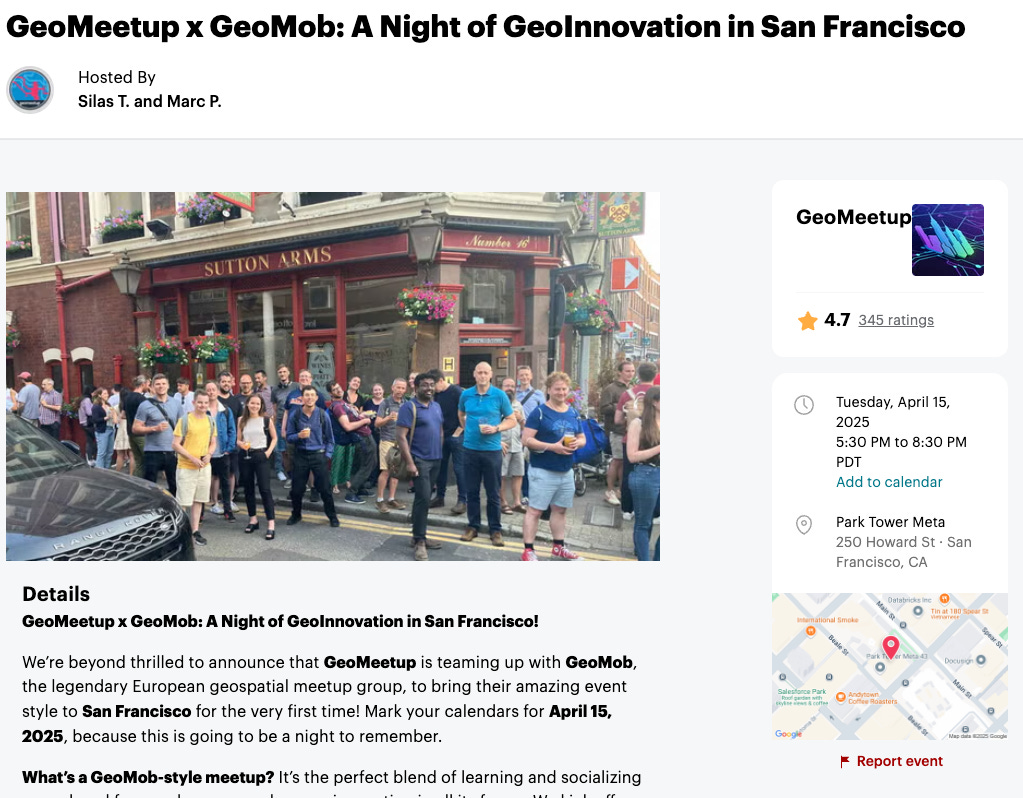
Want to learn more? Post a comment below! And if you're in the Bay Area, join me at GeoMob SF on April 15th where I'll be diving deeper into “vibe coding with maps”. With drinks afterward. It’ll be lovely.
2. What Exactly is "Vibe Coding"?
"Vibe Coding" is a term that’s gaining traction. For me, it’s less about writing precise, line-by-line instructions for an AI assistant and more about conveying your intent and the desired outcome in natural language, often iteratively. You're essentially giving the AI the "vibe" of what you want to build, guiding it towards the goal without specifying every single implementation detail upfront.
However, let's be clear about what it’s not. It's not a magic wand, and it's certainly not a replacement for software engineering or DevRel expertise. I often think back to my experience as a mechanical engineer. When Finite Element Analysis (FEA) and CAD tools became mainstream, they didn't eliminate the need for engineers. Instead, the role evolved. Engineers spent less time on manual drafting and calculations and more time applying their engineering judgment: Are these the correct assumptions? Is this simplification of the analysis valid? Are the boundary conditions appropriate for this design? Is this manufacturable at scale? AI assistance is similar – it shifts where we apply our expertise.
Think of it like an architect sketching initial design concepts before drafting detailed blueprints. They capture the essence, the feeling, the core function first. Or, consider planning a hike in Yosemite using Strava or a similar tool. You might initially search for something like "challenging trail near Yosemite Falls with good views" – that’s the vibe. Only after finding promising options do you dive into plotting precise waypoints, checking elevation profiles, and confirming water sources – the detailed implementation.
Why does this matter for builders, especially those in DevRel or supporting developers?
Overcoming the Blank Page: It’s fantastic for quickly bootstrapping code for common patterns, like setting up a basic map interface or making an initial API call.
Accelerating Developer Adoption: It can help developers explore new APIs or libraries (like deck.gl for visualization) much faster by generating initial working examples tailored to their needs.
Reducing Boilerplate: AI can handle repetitive setup code (HTML structure, basic configurations, import statements), freeing up developers to focus on the unique, complex logic of their application.
Fast Iteration: It allows for quick pivots and refinements based on natural language feedback ("Okay, now add markers based on this data," or, "Change the map style to dark mode").
3. The Experiment Setup: Grounding is Everything
For my experiments, I primarily used VSCode with the Cline extension, leveraging the Gemini 2.5 Pro model via its API. Another tool I find myself using frequently for exploration is Google AI Studio. My focus was on generating code snippets (mostly JavaScript and Python) for common mapping use cases involving the Google Maps Platform Maps JavaScript SDK, Places API, and Routes API.
Here’s where we hit the practical wall: Base LLMs, trained on broad internet data, struggle significantly with the nuances of any developer platform specialization. Whether it's Google Maps Platform, Twilio, Stripe, or a niche vertical API, these platforms have specific SDKs, authentication methods, best practices, rate limits, and evolving features.
Base models often:
Hallucinate methods or parameters that don't exist, or are outdated in the latest versions.
Use deprecated patterns found in older training data, like developer blogs or StackOverflow posts.
Misunderstand required data types, structures, or authentication flows as part of a real-world app.
Fail to incorporate platform-specific best practices for UI/UX, performance, or cost.
Developer platforms often provide multiple ways to accomplish a task. Some might be legacy and deprecated, others might have more documentation and examples simply because they've been around longer, and new features might change frequently and not be reflected in the model’s base training knowledge. The result? Code that looks plausible but is subtly wrong, leading to frustrating debugging cycles that can negate any potential time savings.

Image credit: Gemini-2.0-Flash-exp-image-generation on April 6, 2025
Hypothesis: Curated Context (or practical RAG)
To address this fundamental limitation, we experimented heavily with providing the LLM with curated context alongside the prompt. This is essentially a practical application of Retrieval-Augmented Generation (RAG).
What it is: Think of it as a hand-picked, highly relevant 'cheat sheet' for the AI, specific to the task and the platform. It might include:
Known-good, up-to-date code examples for common tasks (e.g., initializing the map SDK correctly, making a specific API call).
Key snippets from official documentation explaining crucial parameters or concepts.
Relevant style guides or architectural best practices.
Links to canonical resources. We experimented with various ways to structure and provide this context, including simple, well-organized text files that could be easily included in the prompt.
Why it's Crucial: This “curated context” approach resonates deeply with my Solution Architecture (SA) background. Just like an SA needs deep domain knowledge and context about a customer's environment to design an effective solution, the AI needs relevant, accurate grounding to generate useful output for a specialized platform. This curated context drastically reduces hallucinations and steers the AI towards generating accurate, simple code aligned with current standards. It bridges the gap between the LLM's general knowledge and the specific requirements of the developer platform.
Experiment Approach: Test prompts for common developer scenarios with and without this curated context, comparing the quality, accuracy, and usability of the generated code.
4. Experiment - Visualizing data with Google Maps Platform using deck.gl
A frequent map use case developers want is to create compelling data visualizations with maps. Let's take a common scenario:
The DevRel Goal: "Help developers quickly create a compelling web map visualization to display a large dataset like NYC bike sharing."
Attempt 1: Prompt without Context:
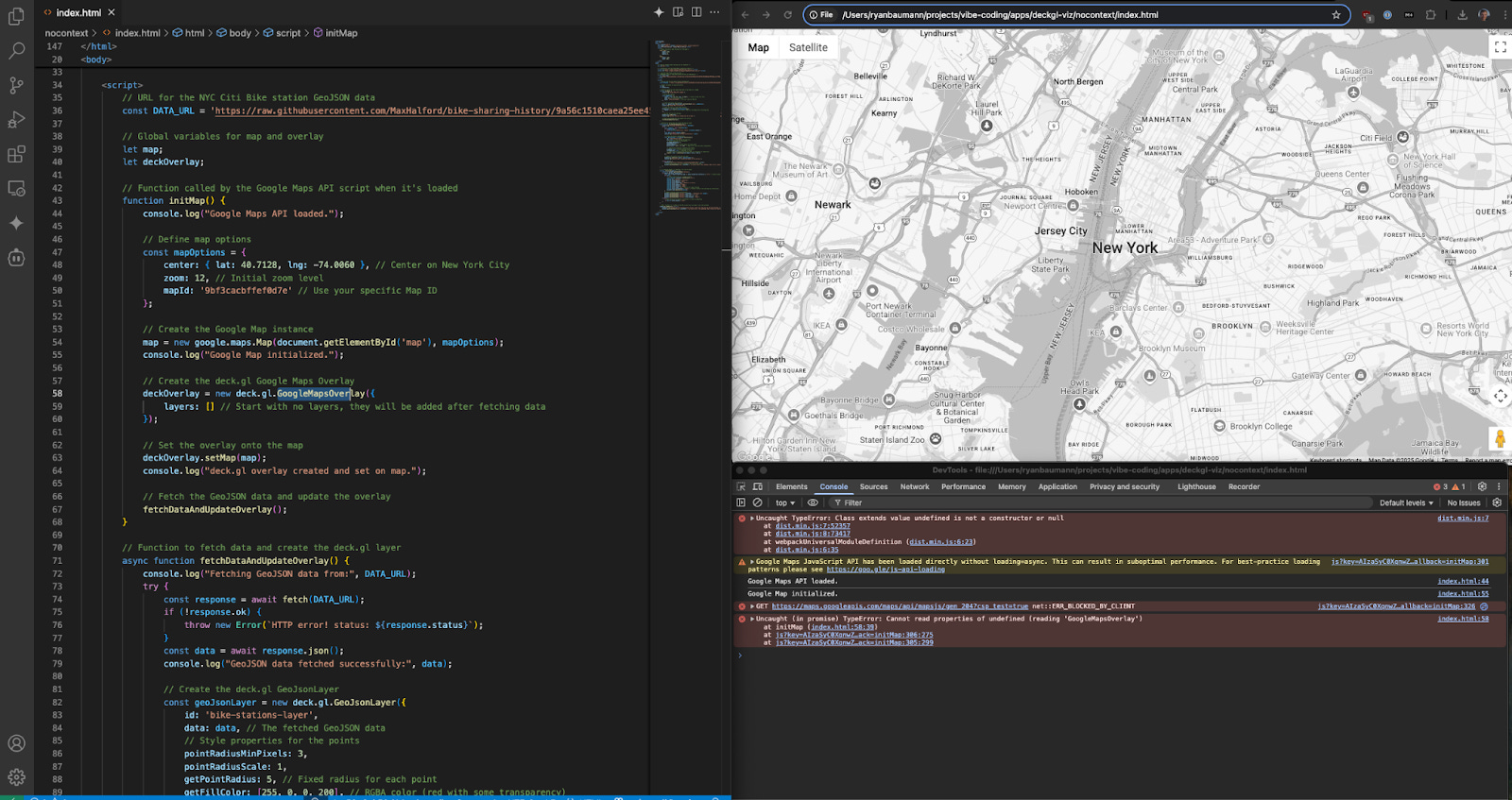
Prompt Example: "Generate a simple website as index.html using Google Maps JS API and deck.gl to fetch geojson data information, and visualize it on a map. You can find NYC bike data here in geojson format: https://raw.githubusercontent.com/MaxHalford/bike-sharing-history/9a56c1510caea25ee45a6f7298bcd4917da49c11/data/stations/new-york-city/citibike.geojson “
Result: The output is flawed immediately. It used incorrect syntax for loading the Google Maps Platform JavaScript SDK, it didn’t know how to use Deck.gl layers with a Google Map JS API. Debugging this often took longer than writing the basic structure from scratch.
Attempt 2: Prompt with Curated Context from Google Maps Platform samples:
Prompt Example: Exactly the same as above!
Result: Significantly better. The generated code used the correct Google Maps Platform API patterns (e.g., proper SDK loading, deck.gl usage), integrated deck.gl more smoothly using established integration patterns, and provided a much closer, functional, starting point. It wasn't always perfect, but the time needed for iteration and refinement was drastically reduced.
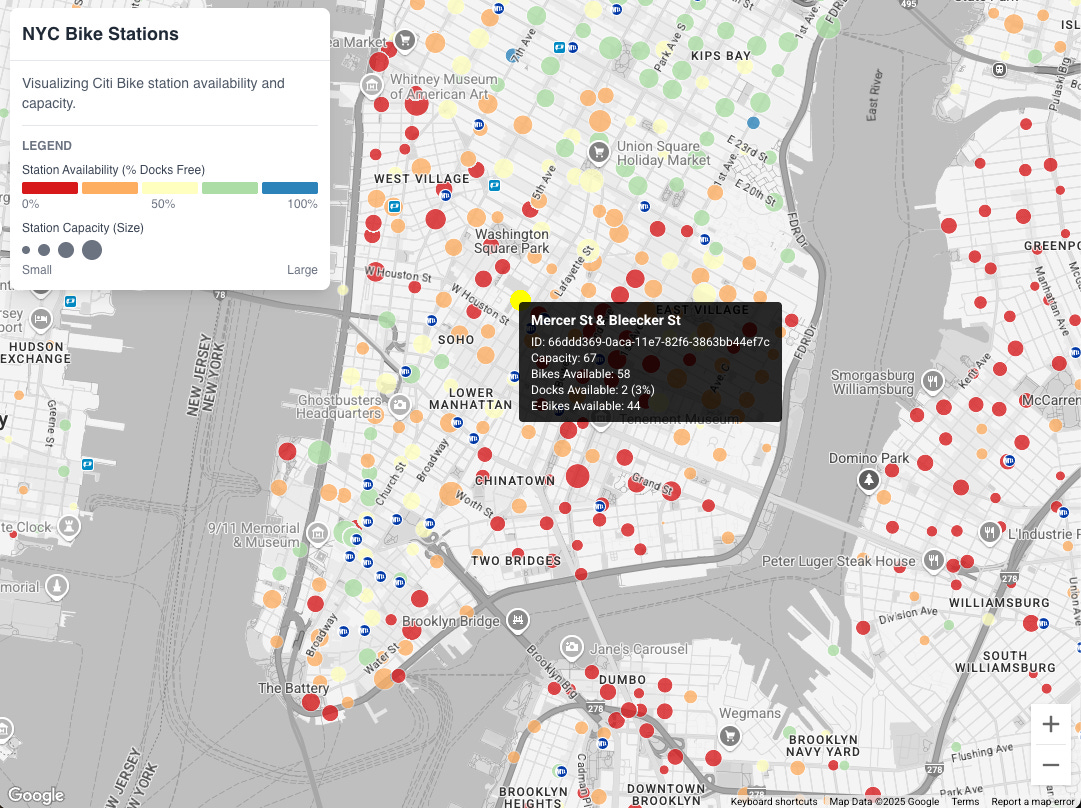
Analysis: Much better! The curated context provided the specific, up-to-date patterns and integration points that the base model lacked. This (and many other) experiments clearly demonstrated the power and necessity of grounding for generating useful code, especially when combining multiple libraries or dealing with use-case tasks.
6. Key Learnings & Hard-Won Takeaways
After numerous experiments targeting various DevRel tasks (code generation, documentation summaries, sample app scaffolding), several key themes emerged:
1. Curated Context is Non-Negotiable for Specialized Domains: This is the single biggest takeaway. For complex, evolving platforms like Google Maps Platform or any other specialized API/SDK provider, base models alone are insufficient for reliably generating accurate, useful code. What’s more, base models change monthly at this point - so you can’t rely on one always working for your devs. Investing time in creating and maintaining high-quality, targeted context (whether through sophisticated RAG pipelines or simpler curated files approach) is paramount.
2. AI is a Co-Pilot, Not Autopilot: AI assistance is incredibly powerful for specific tasks:
Accelerating the first draft (getting from 0 to 1 faster).
Generating boilerplate code (map setup, basic functions, HTML structure).
Exploring options and syntax quickly ("Show me how to do X in Python vs. Node.js").
Refactoring or translating relatively simple, well-defined code snippets.
BUT, developers absolutely must debug, validate, refactor, and guide the AI. It doesn't (yet) replace deep platform understanding, architectural thinking, or critical evaluation.
For DevRel, this means AI can speed up developer adoption and creation of code samples and docs, but rigorous standards, human review, testing remain essential for accuracy and trustworthiness.
3. Quantifying Productivity:
Real Time Savings: There are clear wins in generating boilerplate (HTML/JS map setup), performing simple translations (e.g., Python sample to Node.js), and implementing well-defined patterns when provided with good context.
Time Sinks: Debugging subtle AI-introduced errors, fighting hallucinations when asking for complex or novel logic without good context, and spending excessive time crafting the "perfect" prompt when good context would have been more effective.
Overall: AI assistance is a potential productivity accelerator, but only if used strategically and paired with high-quality, relevant context.
4. The Future is Likely Agents & More Sophisticated Grounding: The real step-change in productivity will likely come from more sophisticated AI systems. Imagine AI agents that can decompose a complex request ("Build a full store locator application using our standard React components and the latest Google Maps Platform APIs"), leverage a curated set of tools and context (like specific API client libraries, documentation databases, curated context or RAG agents for docs and samples), perform actions, and generate near-complete, high-quality solutions. New standards like Anthropic’s Model-Controller-Peripheral (MCP) could help these AI tools point towards this future of more capable, tool-using AI. Our current experiments are valuable stepping stones on that path.
5. Trust but Verify (Responsible AI): Especially when generating code that will be shared publicly – in demos, code samples, documentation, or tutorials – always rigorously test and validate the AI's output. Accuracy, security, performance, and adherence to best practices are critical for building developer trust. AI can potentially assist in writing tests or performing static analysis, but ultimately, the human engineer’s judgement and review is most important.
7. Recommendations for Fellow Builders
Image credit: Gemini-2.0-Flash-exp-image-generation on April 6, 2025
Based on these experiments, here’s my practical advice for developers, DevRel engineers, and product & engineering leaders looking to leverage AI assistance with developer platforms:
Embrace AI Assistance: Base models are improving rapidly, and AI assistance is becoming embedded in more developer tools. This isn't going away. As DevRel leaders, Solution Architects, and builders, we need to learn how to use these tools effectively. But recognize it’s not point-and-shoot; you need to engineer the prompts, the context, the evaluation process, and the desired outcome.
Start Pragmatically: Don't try to boil the ocean. Identify specific, often repetitive tasks where generating boilerplate code, initial drafts, or simple translations creates bottlenecks. Focus your initial AI experiments there.
Build Your Context Library: Invest time in curating your own set of high-quality code snippets, architectural patterns, best practice documents, and key documentation links for the APIs, libraries, and domains you work with most frequently. Even a simple, well-organized text file or internal wiki page used for context injection can make a huge difference.
Master Prompting with Context: Focus on learning how to effectively provide relevant context alongside your natural language prompts. This skill is often more impactful than crafting hyper-complex prompts in isolation.
Use AI for Exploration and Learning: Leverage AI assistants to quickly get the gist of a new library, API feature, or programming concept. Ask it "how do I..." or "explain this..." but always try to provide relevant documentation links or code examples as context for better results.
Set Realistic Expectations & Maintain Critical Thinking: Treat AI as a powerful assistant that requires guidance, verification, and refinement – not a magic wand. Keep your engineering judgment and critical thinking skills front and center. Question the output, test thoroughly, and be prepared to iterate.
8. Conclusion: The Builder is the Architect, Even with AI Assistance
AI assistance, particularly when effectively grounded with relevant, high-quality context, will (and already is) accelerating developer workflows, and the experience created by Developer Relations teams is more important for platform growth than ever before. Experiments with "Vibe Coding" and curated context for Google Maps Platform demonstrate clear benefits for developer learning, activation, security, and time-to-production.
However, it's crucial to remember that AI is a tool – a powerful co-pilot, perhaps, but still a tool. The builder – with their domain expertise, critical thinking, understanding of user needs, and architectural vision – remains the architect. The true value emerges not from blindly trusting the AI, but from learning how to wield it for your task.
What are your experiences using AI for development, especially when working with specialized platforms or complex APIs? Have you experimented with providing context or using RAG or MCP? What lessons have you learned? Share your thoughts and findings in the comments below.
Want to learn and share more about using “curated context” for AI Assistance and map app development? Join me at GeoMob SF on April 15th to learn more!